报错解决:IEEE latex模版中thanks不显示 隶属关系 / 邮箱不显示
本人在使用IEEE官方LaTeX模版(IEEEtran.cls)撰写论文时,遇到一个共性问题:明明在\author中用\thanks加了作者隶属关系(单位)和通讯邮箱,编译后却完全不显示;或是作者名右上角标记异常(比如想显示“1”却出现“*”)。这并非代码bug,而是IEEE模版的专属排版规则——它和普通LaTeX文档的作者信息配置逻辑完全不同。
前言
本人在使用IEEE官方LaTeX模版(IEEEtran.cls)撰写论文时,遇到一个共性问题:明明在\author中用\thanks加了作者隶属关系(单位)和通讯邮箱,编译后却完全不显示;或是作者名右上角标记异常(比如想显示“1”却出现“*”)。这并非代码bug,而是IEEE模版的专属排版规则——它和普通LaTeX文档的作者信息配置逻辑完全不同。
一、本博客可以解决的问题
在开始解决前,先对号入座,确认问题场景:
- 隶属关系/邮箱“消失”:用
\author{XXX\thanks{单位:XX大学;邮箱:XX@xx.com}}配置后,编译后作者名下方没有单位和邮箱,只显示作者名; \thanks内容错位:\thanks里的单位/邮箱跑到了论文末尾的“致谢”部分,而非作者信息区;- 作者标记异常:用
\IEEEauthorrefmark{1}想显示“1”,结果右上角是“*”(星号),和预期不符。
隶属关系/邮箱“消失 例如以下效果(人名等均为虚构):
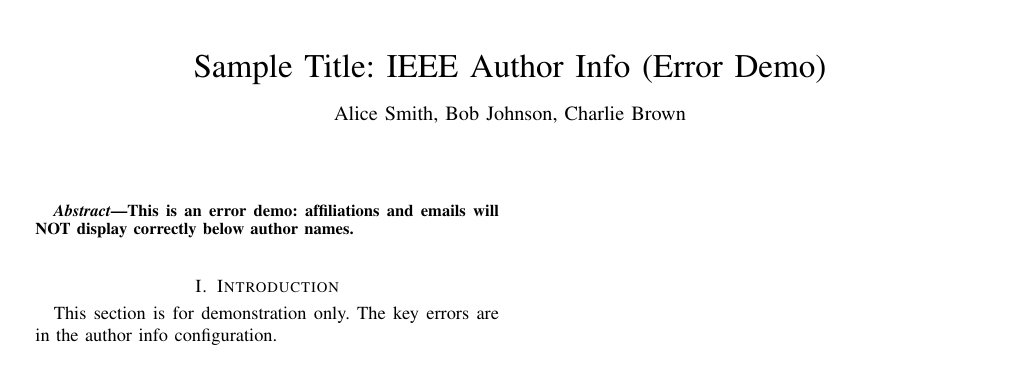
原本代码如下:
% 文档类:IEEE期刊格式(正确,但内容配置错误)
\documentclass[lettersize,journal]{IEEEtran}

% 错误点1:重复加载宏包+冗余宏包(可能引发冲突)
\usepackage{graphicx}
\usepackage{graphicx} % 重复加载
\usepackage{caption} % 非必要宏包,可能干扰排版

\begin{document}

	% 标题(正确)
	\title{Sample Title: IEEE Author Info (Error Demo)}

	% 错误点2:用普通\author格式,未使用IEEE专属block命令
	\author{
		Alice Smith, Bob Johnson, Charlie Brown% 所有作者挤在一行,无单独块
		% 错误点3:用\thanks代替\IEEEauthorblockA添加单位,且未关联作者
		\thanks{Department of Electrical Engineering, XYZ University, City A, Province B, 56789, Country X}%
		\thanks{Institute of Computer Science, ABC Research Center, City C, Province D, 101112, Country Y}%
		% 错误点4:邮箱用\thanks添加,未单独成块
		\thanks{Corresponding emails: alice.smith@xyz.edu; charlie.brown@abc.org}%
		% 错误点5:省略\IEEEauthorrefmark,无作者-单位关联标记
	}

	% 生成标题(正确,但内容会异常)
	\maketitle

	% 摘要(结构完整,不影响错误现象)
	\begin{abstract}
		This is an error demo: affiliations and emails will NOT display correctly below author names.
	\end{abstract}

	\section{Introduction}
	This section is for demonstration only. The key errors are in the author info configuration.

\end{document}
二、问题根源:误用普通LaTeX规则,忽略IEEE专属逻辑
这个其实在模版的注释内容里面是有说到的,但是我一开始确实也没有认真看。IEEE模版为了符合期刊/会议的严格排版规范,设计了独立的作者信息管理体系,普通LaTeX的\thanks用法在这里完全“水土不服”,核心原因有3个:
1. \thanks在IEEE模版中的用途被“限定”
普通LaTeX中,\thanks可随意添加脚注信息(单位、邮箱、致谢等);但在IEEEtran中,\thanks仅用于“致谢内容”(比如“感谢XX基金资助”),一旦把单位/邮箱放进\thanks,这些信息会被自动屏蔽或者被归类到论文末尾的致谢区,而非作者名下方。
2. 作者信息需要用IEEE专属命令组织
IEEE模版不认可“直接在\author里堆内容”的方式,必须用以下3个命令分工协作:
\IEEEauthorblockN{}:专门放作者姓名,搭配\IEEEauthorrefmark{数字}标记作者所属单位;\IEEEauthorblockA{}:专门放隶属关系/邮箱,用\IEEEauthorrefmark{数字}与作者名关联;\IEEEauthorrefmark{数字}:建立“作者-单位”的对应关系,默认显示为符号(*、†等),而非数字。
3. 编译顺序或重复宏包导致信息“丢失”
- 未按“PDFLaTeX → BibTeX → PDFLaTeX×2”的顺序编译,导致辅助文件(.aux)未更新,信息无法渲染;
- 重复加载宏包(如
graphicx、caption),可能引发编译冲突,干扰作者信息的显示。
三、分步解决
针对上述问题,给出可直接复用的解决方案,以“4位作者同属1个单位+2个通讯邮箱”为例(适配多数场景)。
第一步、用IEEE专属命令重构作者信息
删除原有的\author代码,替换为以下规范结构(关键命令已标注说明):
% 文档类:IEEE期刊格式,letter纸张大小
\documentclass[lettersize,journal]{IEEEtran}

% 仅保留必要宏包(确保作者信息渲染正常)
\usepackage{graphicx} % 基础排版支持(IEEE模板必要依赖)

\begin{document}

% 标题(虚拟)
\title{Sample Title: IEEE Author Info Demo}

% 作者信息(核心部分:虚拟名字、单位、邮箱)
\author{
  % 作者名块:每个作者单独列出,用\IEEEauthorrefmark{1}标记所属单位
  \IEEEauthorblockN{Alice Smith\IEEEauthorrefmark{1}}
  \IEEEauthorblockN{Bob Johnson\IEEEauthorrefmark{1}}
  \IEEEauthorblockN{Charlie Brown\IEEEauthorrefmark{2}}

  % 单位块1:与作者1、2关联(虚拟学校)
  \IEEEauthorblockA{\IEEEauthorrefmark{1} Department of Electrical Engineering,
  XYZ University, City A, Province B, 56789, Country X}

  % 单位块2:与作者3关联(虚拟研究所)
  \IEEEauthorblockA{\IEEEauthorrefmark{2} Institute of Computer Science,
  ABC Research Center, City C, Province D, 101112, Country Y}

  % 邮箱块:通讯作者邮箱(虚拟)
  \IEEEauthorblockA{Corresponding emails: alice.smith@xyz.edu (A. Smith);
  charlie.brown@abc.org (C. Brown)}
}

% 生成标题和作者信息
\maketitle

% 简单摘要(确保文档结构完整,不影响作者信息显示)
\begin{abstract}
This is a demo to show how to correctly display author affiliations and emails in IEEE LaTeX templates.
\end{abstract}

% 正文开头(可选,仅为展示完整文档结构)
\section{Introduction}
This section is for demonstration only. The key part is the author info above.

\end{document}
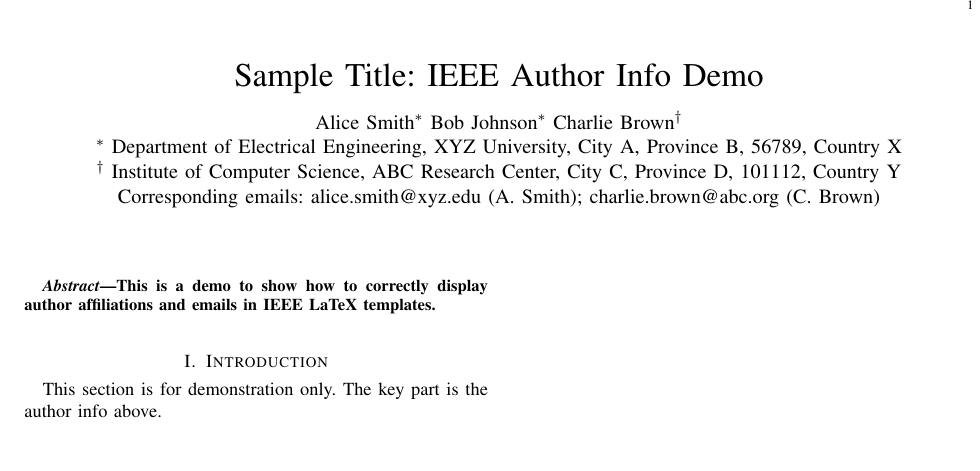
效果:
作者名→单位→邮箱会按顺序显示,单位和邮箱自动换行,“作者-单位”通过右上角符号(如*)关联,完全符合IEEE规范。
第二步:解决“作者名右上角是*不是1”的问题
很多人会疑惑:明明写了\IEEEauthorrefmark{1},为何显示*?这是IEEE的默认设计(符号比数字更简洁,避免与公式/章节号混淆),无需修改。
若目标期刊明确要求显示数字(极少数情况),可在导言区(\documentclass之后)添加以下代码,强制重定义符号为数字:
% 重定义\IEEEauthorrefmark,让参数直接显示为上标数字
\renewcommand{\IEEEauthorrefmark}[1]{\textsuperscript{#1}}
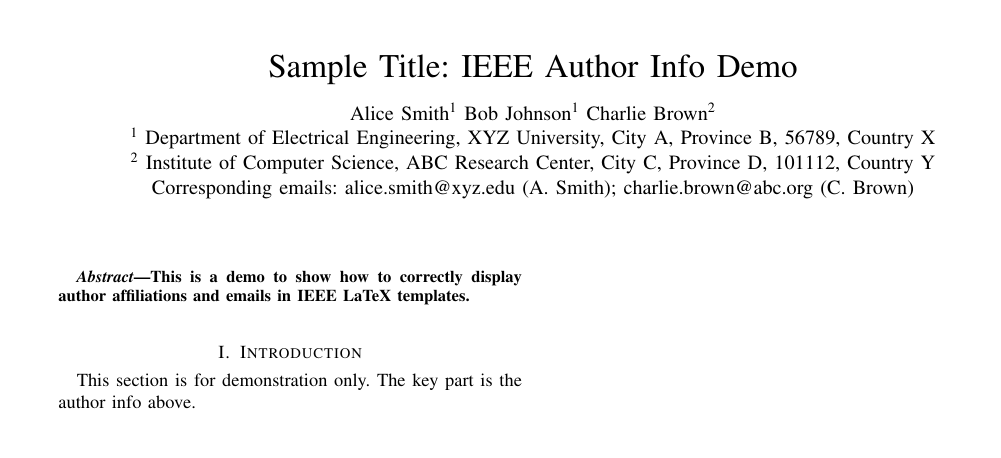
效果:
\IEEEauthorrefmark{1}会显示为¹,单位块中的标记也同步变为¹,保持关联一致。
四、避坑指南:3个容易忽略的关键点
- 不要用
\footnotemark替代\IEEEauthorrefmark:
IEEE模版会自动禁用\footnotemark在\author中的功能,强行使用会导致标记不显示。 \IEEEauthorblockA无需手动加\\换行:
每个\IEEEauthorblockA会自动另起一段并预留间距,手动加\\反而可能导致排版错乱。- 优先遵循IEEE规范,不随意自定义:
除非期刊明确允许,否则不要修改默认符号(*、†等)、间距等,避免因格式不符被拒稿。
五、常见问题Q&A
Q1:按上述代码修改后,邮箱还是不显示?
A1:检查是否漏了\maketitle命令(\author之后必须有\maketitle才能渲染作者信息),且确保编译次数≥3次。
Q2:多个单位如何配置?比如作者1属单位1,作者2属单位2?
A2:用\IEEEauthorrefmark{1}和\IEEEauthorrefmark{2}区分,对应两个\IEEEauthorblockA(以下为虚拟信息示例):
\author{
  \IEEEauthorblockN{Emma Davis\IEEEauthorrefmark{1}}  % 作者1(属单位1)
  \IEEEauthorblockN{Frank Miller\IEEEauthorrefmark{2}}  % 作者2(属单位2)
  % 单位1信息(与作者1关联)
  \IEEEauthorblockA{\IEEEauthorrefmark{1} School of Mechanical Engineering,
  First University, Virtual City X, 45678, Country M}
  % 单位2信息(与作者2关联)
  \IEEEauthorblockA{\IEEEauthorrefmark{2} Department of Biomedical Science,
  Second Institute of Technology, Virtual City Y, 90123, Country N}
}
Q3:\IEEEauthorblockA中的内容太长,如何换行?
A3:在需要换行的地方加\linebreak(而非\\),避免破坏块结构(以下为虚拟信息示例):
\IEEEauthorblockA{Corresponding emails: emma.davis@firstu.edu (E. Davis);
\linebreak frank.miller@secondinst.org (F. Miller)}
总结
IEEE LaTeX模版的作者信息显示问题,本质是“不熟悉专属规则”。
只要记住:用\IEEEauthorblockN/A分工,\IEEEauthorrefmark关联,按顺序编译
建议在投稿前对照目标期刊的“Author Guidelines”,确保格式完全匹配——细节决定成败,规范的排版能给审稿人留下更好的第一印象。
報錯解決:IEEE latex模版中thanks不顯示 隸屬關係 / 郵箱不顯示
本人在使用IEEE官方LaTeX模版(IEEEtran.cls)撰寫論文時,遇到一個共性問題:明明在\author中用\thanks加了作者隸屬關係(單位)和通訊郵箱,編譯後卻完全不顯示;或是作者名右上角標記異常(比如想顯示“1”卻出現“*”)。這並非代碼bug,而是IEEE模版的專屬排版規則——它和普通LaTeX文檔的作者信息配置邏輯完全不同。
來源:https://blog.csdn.net/2403_87969572/article/details/153841352
抓取時間(ISO本地):2026-05-18 05:17:07
文章目錄
前言
本人在使用IEEE官方LaTeX模版(IEEEtran.cls)撰寫論文時,遇到一個共性問題:明明在\author中用\thanks加了作者隸屬關係(單位)和通訊郵箱,編譯後卻完全不顯示;或是作者名右上角標記異常(比如想顯示“1”卻出現“*”)。這並非代碼bug,而是IEEE模版的專屬排版規則——它和普通LaTeX文檔的作者信息配置邏輯完全不同。
一、本博客可以解決的問題
在開始解決前,先對號入座,確認問題場景:
- 隸屬關係/郵箱“消失”:用
\author{XXX\thanks{單位:XX大學;郵箱:XX@xx.com}}配置後,編譯後作者名下方沒有單位和郵箱,只顯示作者名; \thanks內容錯位:\thanks裡的單位/郵箱跑到了論文末尾的“致謝”部分,而非作者信息區;- 作者標記異常:用
\IEEEauthorrefmark{1}想顯示“1”,結果右上角是“*”(星號),和預期不符。
隸屬關係/郵箱“消失 例如以下效果(人名等均為虛構):
原本代碼如下:
% 文檔類:IEEE期刊格式(正確,但內容配置錯誤)
\documentclass[lettersize,journal]{IEEEtran}

% 錯誤點1:重複加載宏包+冗餘宏包(可能引發衝突)
\usepackage{graphicx}
\usepackage{graphicx} % 重複加載
\usepackage{caption} % 非必要宏包,可能干擾排版

\begin{document}

	% 標題(正確)
	\title{Sample Title: IEEE Author Info (Error Demo)}

	% 錯誤點2:用普通\author格式,未使用IEEE專屬block命令
	\author{
		Alice Smith, Bob Johnson, Charlie Brown% 所有作者擠在一行,無單獨塊
		% 錯誤點3:用\thanks代替\IEEEauthorblockA添加單位,且未關聯作者
		\thanks{Department of Electrical Engineering, XYZ University, City A, Province B, 56789, Country X}%
		\thanks{Institute of Computer Science, ABC Research Center, City C, Province D, 101112, Country Y}%
		% 錯誤點4:郵箱用\thanks添加,未單獨成塊
		\thanks{Corresponding emails: alice.smith@xyz.edu; charlie.brown@abc.org}%
		% 錯誤點5:省略\IEEEauthorrefmark,無作者-單位關聯標記
	}

	% 生成標題(正確,但內容會異常)
	\maketitle

	% 摘要(結構完整,不影響錯誤現象)
	\begin{abstract}
		This is an error demo: affiliations and emails will NOT display correctly below author names.
	\end{abstract}

	\section{Introduction}
	This section is for demonstration only. The key errors are in the author info configuration.

\end{document}
二、問題根源:誤用普通LaTeX規則,忽略IEEE專屬邏輯
這個其實在模版的註釋內容裡面是有說到的,但是我一開始確實也沒有認真看。IEEE模版為了符合期刊/會議的嚴格排版規範,設計了獨立的作者信息管理體系,普通LaTeX的\thanks用法在這裡完全“水土不服”,核心原因有3個:
1. \thanks在IEEE模版中的用途被“限定”
普通LaTeX中,\thanks可隨意添加腳註信息(單位、郵箱、致謝等);但在IEEEtran中,\thanks僅用於“致謝內容”(比如“感謝XX基金資助”),一旦把單位/郵箱放進\thanks,這些信息會被自動屏蔽或者被歸類到論文末尾的致謝區,而非作者名下方。
2. 作者信息需要用IEEE專屬命令組織
IEEE模版不認可“直接在\author裡堆內容”的方式,必須用以下3個命令分工協作:
\IEEEauthorblockN{}:專門放作者姓名,搭配\IEEEauthorrefmark{數字}標記作者所屬單位;\IEEEauthorblockA{}:專門放隸屬關係/郵箱,用\IEEEauthorrefmark{數字}與作者名關聯;\IEEEauthorrefmark{數字}:建立“作者-單位”的對應關係,默認顯示為符號(*、†等),而非數字。
3. 編譯順序或重複宏包導致信息“丟失”
- 未按“PDFLaTeX → BibTeX → PDFLaTeX×2”的順序編譯,導致輔助文件(.aux)未更新,信息無法渲染;
- 重複加載宏包(如
graphicx、caption),可能引發編譯衝突,干擾作者信息的顯示。
三、分步解決
針對上述問題,給出可直接複用的解決方案,以“4位作者同屬1個單位+2個通訊郵箱”為例(適配多數場景)。
第一步、用IEEE專屬命令重構作者信息
刪除原有的\author代碼,替換為以下規範結構(關鍵命令已標註說明):
% 文檔類:IEEE期刊格式,letter紙張大小
\documentclass[lettersize,journal]{IEEEtran}

% 僅保留必要宏包(確保作者信息渲染正常)
\usepackage{graphicx} % 基礎排版支持(IEEE模板必要依賴)

\begin{document}

% 標題(虛擬)
\title{Sample Title: IEEE Author Info Demo}

% 作者信息(核心部分:虛擬名字、單位、郵箱)
\author{
  % 作者名塊:每個作者單獨列出,用\IEEEauthorrefmark{1}標記所屬單位
  \IEEEauthorblockN{Alice Smith\IEEEauthorrefmark{1}}
  \IEEEauthorblockN{Bob Johnson\IEEEauthorrefmark{1}}
  \IEEEauthorblockN{Charlie Brown\IEEEauthorrefmark{2}}

  % 單位塊1:與作者1、2關聯(虛擬學校)
  \IEEEauthorblockA{\IEEEauthorrefmark{1} Department of Electrical Engineering,
  XYZ University, City A, Province B, 56789, Country X}

  % 單位塊2:與作者3關聯(虛擬研究所)
  \IEEEauthorblockA{\IEEEauthorrefmark{2} Institute of Computer Science,
  ABC Research Center, City C, Province D, 101112, Country Y}

  % 郵箱塊:通訊作者郵箱(虛擬)
  \IEEEauthorblockA{Corresponding emails: alice.smith@xyz.edu (A. Smith);
  charlie.brown@abc.org (C. Brown)}
}

% 生成標題和作者信息
\maketitle

% 簡單摘要(確保文檔結構完整,不影響作者信息顯示)
\begin{abstract}
This is a demo to show how to correctly display author affiliations and emails in IEEE LaTeX templates.
\end{abstract}

% 正文開頭(可選,僅為展示完整文檔結構)
\section{Introduction}
This section is for demonstration only. The key part is the author info above.

\end{document}
效果:
作者名→單位→郵箱會按順序顯示,單位和郵箱自動換行,“作者-單位”通過右上角符號(如*)關聯,完全符合IEEE規範。
第二步:解決“作者名右上角是*不是1”的問題
很多人會疑惑:明明寫了\IEEEauthorrefmark{1},為何顯示*?這是IEEE的默認設計(符號比數字更簡潔,避免與公式/章節號混淆),無需修改。
若目標期刊明確要求顯示數字(極少數情況),可在導言區(\documentclass之後)添加以下代碼,強制重定義符號為數字:
% 重定義\IEEEauthorrefmark,讓參數直接顯示為上標數字
\renewcommand{\IEEEauthorrefmark}[1]{\textsuperscript{#1}}
效果:
\IEEEauthorrefmark{1}會顯示為¹,單位塊中的標記也同步變為¹,保持關聯一致。
四、避坑指南:3個容易忽略的關鍵點
- 不要用
\footnotemark替代\IEEEauthorrefmark:
IEEE模版會自動禁用\footnotemark在\author中的功能,強行使用會導致標記不顯示。 \IEEEauthorblockA無需手動加\\換行:
每個\IEEEauthorblockA會自動另起一段並預留間距,手動加\\反而可能導致排版錯亂。- 優先遵循IEEE規範,不隨意自定義:
除非期刊明確允許,否則不要修改默認符號(*、†等)、間距等,避免因格式不符被拒稿。
五、常見問題Q&A
Q1:按上述代碼修改後,郵箱還是不顯示?
A1:檢查是否漏了\maketitle命令(\author之後必須有\maketitle才能渲染作者信息),且確保編譯次數≥3次。
Q2:多個單位如何配置?比如作者1屬單位1,作者2屬單位2?
A2:用\IEEEauthorrefmark{1}和\IEEEauthorrefmark{2}區分,對應兩個\IEEEauthorblockA(以下為虛擬信息示例):
\author{
  \IEEEauthorblockN{Emma Davis\IEEEauthorrefmark{1}}  % 作者1(屬單位1)
  \IEEEauthorblockN{Frank Miller\IEEEauthorrefmark{2}}  % 作者2(屬單位2)
  % 單位1信息(與作者1關聯)
  \IEEEauthorblockA{\IEEEauthorrefmark{1} School of Mechanical Engineering,
  First University, Virtual City X, 45678, Country M}
  % 單位2信息(與作者2關聯)
  \IEEEauthorblockA{\IEEEauthorrefmark{2} Department of Biomedical Science,
  Second Institute of Technology, Virtual City Y, 90123, Country N}
}
Q3:\IEEEauthorblockA中的內容太長,如何換行?
A3:在需要換行的地方加\linebreak(而非\\),避免破壞塊結構(以下為虛擬信息示例):
\IEEEauthorblockA{Corresponding emails: emma.davis@firstu.edu (E. Davis);
\linebreak frank.miller@secondinst.org (F. Miller)}
總結
IEEE LaTeX模版的作者信息顯示問題,本質是“不熟悉專屬規則”。
只要記住:用\IEEEauthorblockN/A分工,\IEEEauthorrefmark關聯,按順序編譯
建議在投稿前對照目標期刊的“Author Guidelines”,確保格式完全匹配——細節決定成敗,規範的排版能給審稿人留下更好的第一印象。
Fix: IEEE LaTeX Template — `\thanks` Hides Affiliation / Email
On the official IEEEtran.cls template, I put affiliation and email inside \thanks under \author, but they never appeared—or markers showed * instead of 1. This is not a random bug; IEEE author blocks follow their own rules, not generic article \thanks usage.
Captured at (local ISO): 2026-05-18 05:17:07
Preface
On the official IEEEtran.cls template, I put affiliation and email inside \thanks under \author, but they never appeared—or markers showed * instead of 1. This is not a random bug; IEEE author blocks follow their own rules, not generic article \thanks usage.
1. Problems this post solves
- Affiliation/email missing:
\author{Name\thanks{Dept...; email...}}prints names only; \thanksat wrong place: content moves to end-of-paper acknowledgments;- Wrong markers:
\IEEEauthorrefmark{1}renders as*not1.
Broken example (fictitious names):
% Wrong demo
\documentclass[lettersize,journal]{IEEEtran}
\usepackage{graphicx}
\usepackage{graphicx} % duplicate
\usepackage{caption}

\begin{document}
\title{Sample Title: IEEE Author Info (Error Demo)}
\author{
  Alice Smith, Bob Johnson, Charlie Brown
  \thanks{Department of Electrical Engineering, XYZ University...}
  \thanks{Institute of Computer Science, ABC Research Center...}
  \thanks{Corresponding emails: alice.smith@xyz.edu; charlie.brown@abc.org}
}
\maketitle
...
\end{document}
2. Root cause
Comments in the class file mention this, but it is easy to miss:
2.1 \thanks is for acknowledgments only
In IEEEtran, \thanks is for funding/thanks, not affiliation. Affiliation/email in \thanks is suppressed or pushed to the acknowledgment section.
2.2 Use IEEE author blocks
Use:
\IEEEauthorblockN{}— names +\IEEEauthorrefmark{n};\IEEEauthorblockA{}— affiliations/emails with matching marks;\IEEEauthorrefmark{n}— links author to affiliation (default symbols*,†, …).
2.3 Build issues
Run PDFLaTeX → BibTeX → PDFLaTeX ×2; duplicate packages (graphicx, caption) can break author rendering.
3. Step-by-step fix
Step 1: Rebuild \author
\documentclass[lettersize,journal]{IEEEtran}
\usepackage{graphicx}

\begin{document}
\title{Sample Title: IEEE Author Info Demo}

\author{
  \IEEEauthorblockN{Alice Smith\IEEEauthorrefmark{1}}
  \IEEEauthorblockN{Bob Johnson\IEEEauthorrefmark{1}}
  \IEEEauthorblockN{Charlie Brown\IEEEauthorrefmark{2}}

  \IEEEauthorblockA{\IEEEauthorrefmark{1} Department of Electrical Engineering,
  XYZ University, City A, Province B, 56789, Country X}

  \IEEEauthorblockA{\IEEEauthorrefmark{2} Institute of Computer Science,
  ABC Research Center, City C, Province D, 101112, Country Y}

  \IEEEauthorblockA{Corresponding emails: alice.smith@xyz.edu (A. Smith);
  charlie.brown@abc.org (C. Brown)}
}

\maketitle
...
\end{document}
Result: names → affiliations → emails, with matching footnote marks.
Step 2: Force numeric superscripts (if required)
Default 1 → *. For numeric marks:
\renewcommand{\IEEEauthorrefmark}[1]{\textsuperscript{#1}}
4. Pitfalls
- Do not use
\footnotemarkinside\authoron IEEEtran; - Do not add manual
\\inside\IEEEauthorblockA—blocks break paragraphs automatically; - Do not customize spacing/symbols unless the venue allows it.
5. FAQ
Q1: Email still missing?
Ensure \maketitle runs after \author and compile at least three times.
Q2: Multiple affiliations?
Different \IEEEauthorrefmark{1}, {2}, … and matching \IEEEauthorblockA blocks.
Q3: Long affiliation line?
Use \linebreak inside \IEEEauthorblockA, not \\.
Summary
IEEE author layout needs \IEEEauthorblockN / \IEEEauthorblockA + \IEEEauthorrefmark, not generic \thanks. Match the journal’s Author Guidelines before submission—clean metadata helps reviewers.