深度实战:在 GPU 环境下一键部署 Jimeng 中文文生图交互系统
GPU 部署阿里 Jimeng 中文文生图:ModelScope 加载 damo 模型,用 huggingface_hub 补丁解决 cached_download 兼容问题,含单次测试与交互脚本及 OOM 等 FAQ。
这是一篇专门针对 Jimeng (积木/积梦) 中文文生图模型的详细部署教学博客。包含了我们在实战中遇到的所有“坑”及其解决方案,特别是针对库版本冲突的硬核修复。
1. 什么是 Jimeng?
Jimeng 是由阿里巴巴达摩院研发的、专门针对中文语境优化的文生图模型。它将中文 BERT 与 Stable Diffusion 架构深度结合,无需繁琐的英文翻译,直接输入中文(如“古风、水墨、赛博朋克”)即可生成极具东方审美的高质量图像。
2. 部署环境准备
在开始之前,请确保你的机器拥有 NVIDIA GPU(建议显存 8GB 以上)并安装了 Python 3.8+ 环境。
2.1 安装核心依赖库
除了基础的 AI 框架,我们还需要安装阿里云的 oss2 库(用于后续可能的图片云端存储)以及处理库版本冲突所需的补丁工具。
# 升级基础 AI 库
pip install -U modelscope transformers diffusers accelerate torch numpy pillow

# 安装阿里云 OSS 存储库
pip install oss2

# 安装 omegaconf 用于处理特定的模型配置
pip install omegaconf
3. 核心技术痛点:处理版本冲突
注意! 这是部署 Jimeng 模型最关键的一步。由于模型发布较早,它调用的 huggingface_hub 旧版函数 cached_download 在新版库中已被删除。如果不处理,程序会报错 ImportError。
解决方案: 在脚本的最开头手动注入“运行时补丁”。
4. 编写测试脚本
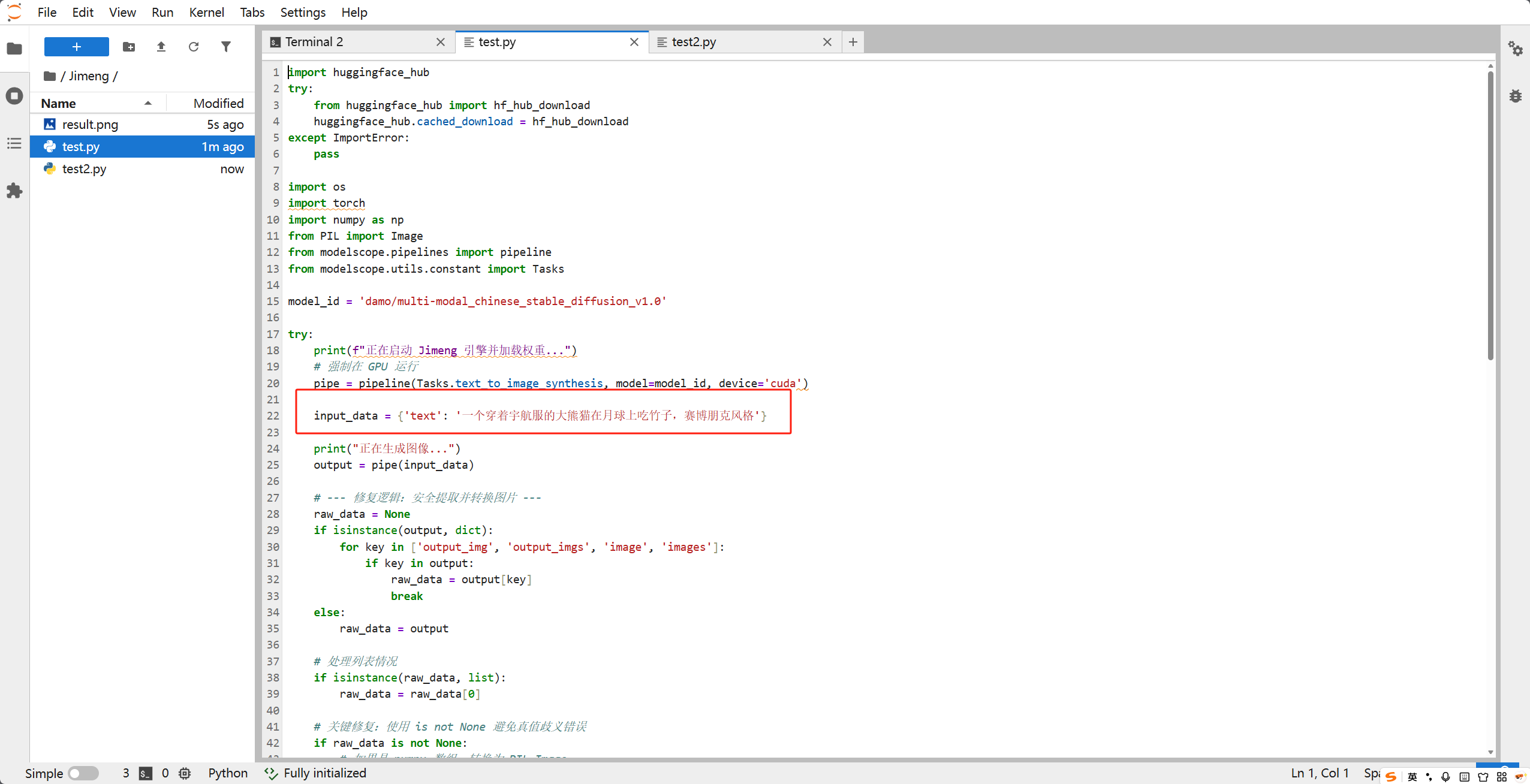
我们将创建一个名为 test_jimeng.py 的脚本。它不仅解决了兼容性问题,还支持一次加载模型、多次交互生成,并具备极强的代码健壮性。
4.1 创建工作目录
mkdir -p ~/workspace/Jimeng && cd ~/workspace/Jimeng
4.2 编写 test_jimeng.py
请将以下代码完整复制到文件中:
import huggingface_hub
try:
    from huggingface_hub import hf_hub_download
    huggingface_hub.cached_download = hf_hub_download
except ImportError:
    pass

import os
import torch
import numpy as np
from PIL import Image
from modelscope.pipelines import pipeline
from modelscope.utils.constant import Tasks

model_id = 'damo/multi-modal_chinese_stable_diffusion_v1.0'

try:
    print(f"正在启动 Jimeng 引擎并加载权重...")
    # 强制在 GPU 运行
    pipe = pipeline(Tasks.text_to_image_synthesis, model=model_id, device='cuda')

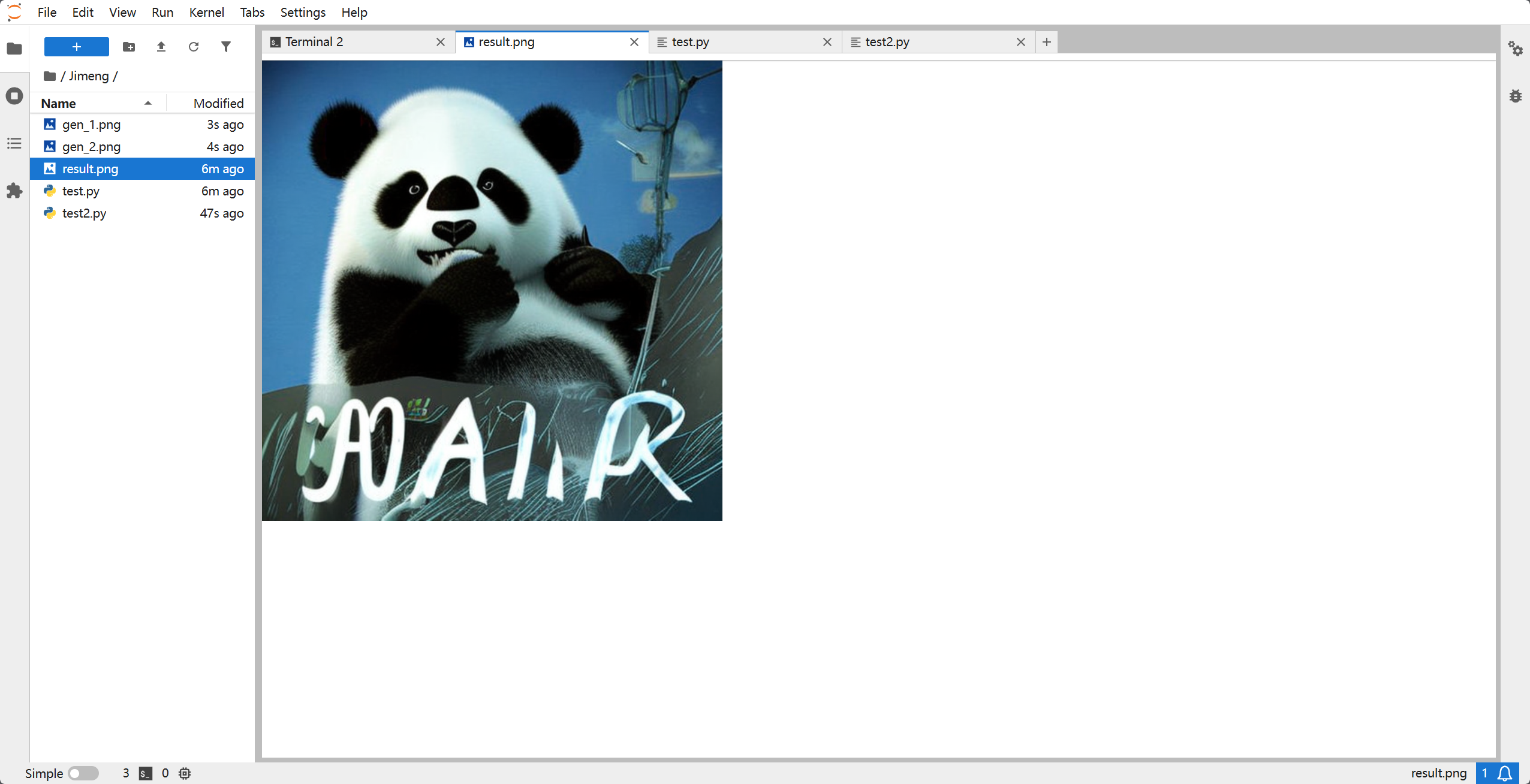
    input_data = {'text': '一个穿着宇航服的大熊猫在月球上吃竹子,赛博朋克风格'}

    print("正在生成图像...")
    output = pipe(input_data)

    # --- 修复逻辑:安全提取并转换图片 ---
    raw_data = None
    if isinstance(output, dict):
        for key in ['output_img', 'output_imgs', 'image', 'images']:
            if key in output:
                raw_data = output[key]
                break
    else:
        raw_data = output

    # 处理列表情况
    if isinstance(raw_data, list):
        raw_data = raw_data[0]

    # 关键修复:使用 is not None 避免真值歧义错误
    if raw_data is not None:
        # 如果是 numpy 数组,转换为 PIL Image
        if isinstance(raw_data, np.ndarray):
            # 如果数组值在 0-1 之间,缩放到 0-255
            if raw_data.max() <= 1.0:
                raw_data = (raw_data * 255).astype(np.uint8)
            final_image = Image.fromarray(raw_data)
        else:
            final_image = raw_data

        final_image.save("result.png")
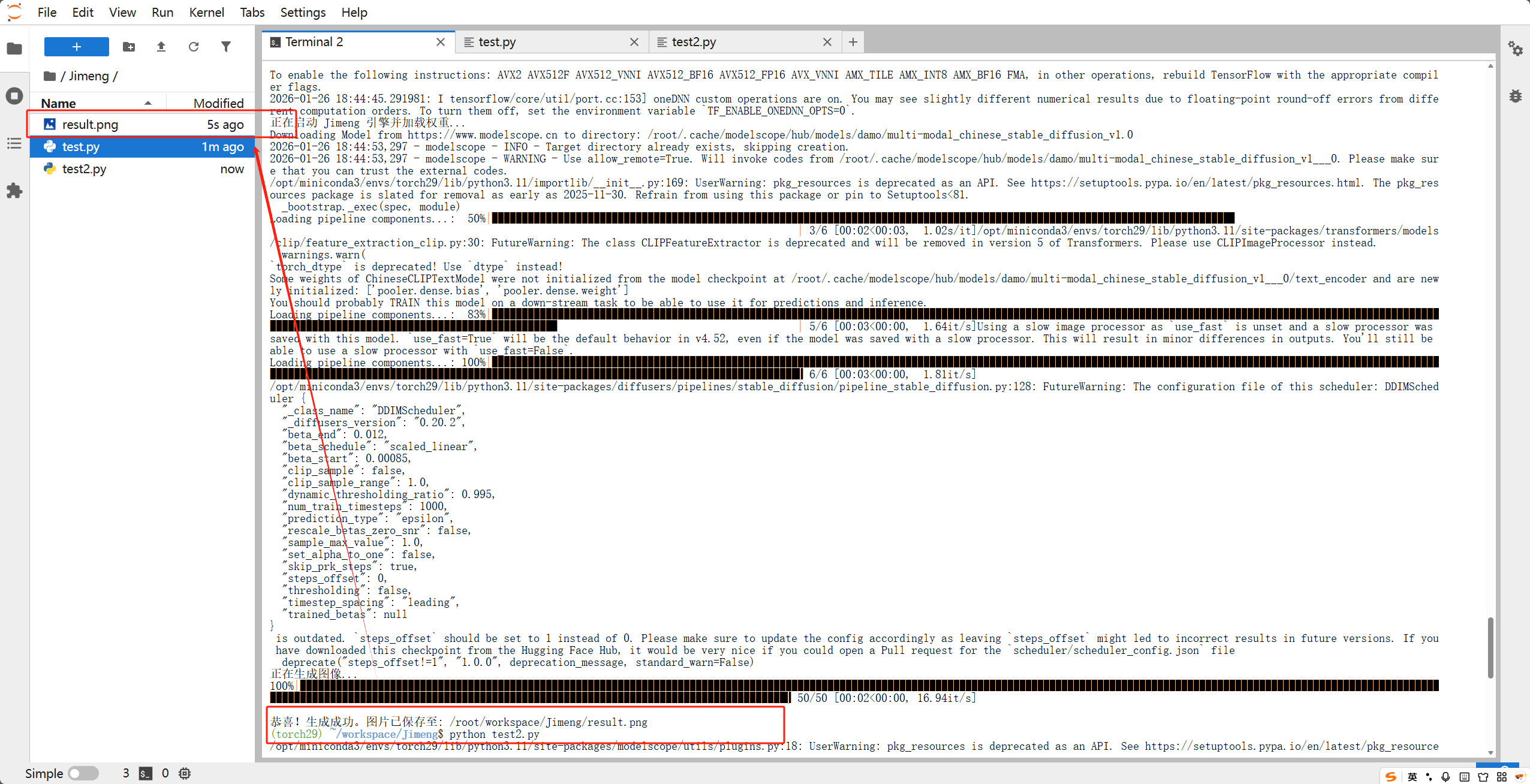
        print(f"\n恭喜!生成成功。图片已保存至: {os.path.abspath('result.png')}")
    else:
        print("未能在输出中找到图像数据。")
4.3 运行与测试
执行以下命令启动系统:
python test_jimeng.py
5. 编写交互式使用脚本
import huggingface_hub
try:
    from huggingface_hub import hf_hub_download
    huggingface_hub.cached_download = hf_hub_download
except: pass

import os
import torch
import numpy as np
from PIL import Image
from modelscope.pipelines import pipeline
from modelscope.utils.constant import Tasks

print("正在初始化 Jimeng 交互引擎,请稍候...")
model_id = 'damo/multi-modal_chinese_stable_diffusion_v1.0'

# 显式指定任务和设备
pipe = pipeline(Tasks.text_to_image_synthesis, model=model_id, device='cuda')

print("\n" + "="*50)
print("  Jimeng 中文文生图交互系统已就绪!")
print("  输入描述开始创作,输入 'exit' 退出。")
print("="*50)

count = 1
while True:
    prompt = input(f"\n[{count}] 请输入生成描述 >> ").strip()

    if prompt.lower() in ['exit', 'quit', '退出']:
        break
    if not prompt: continue

    print(f"正在绘制: {prompt} ...")
    try:
        # 推理
        output = pipe({'text': prompt})

        # --- 健壮的图片提取逻辑 ---
        image = None

        # 情况 A: 返回的是字典
        if isinstance(output, dict):
            print(f"调试信息 - 系统返回键值: {list(output.keys())}")
            # 尝试所有可能的键
            for key in ['output_img', 'output_imgs', 'image', 'images']:
                if key in output:
                    image = output[key]
                    break
            # 如果字典里只有一个值,尝试直接取那个值
            if image is None and len(output) == 1:
                image = list(output.values())[0]

        # 情况 B: 直接返回了对象或列表
        else:
            image = output

        # 如果提取出来的是列表,取第一个
        if isinstance(image, list):
            image = image[0]

        # 转换为 PIL 格式并保存
        if image is not None:
            # 如果是 Numpy 数组,转为 Image 对象
            if isinstance(image, np.ndarray):
                if image.max() <= 1.0: image = (image * 255).astype(np.uint8)
                image = Image.fromarray(image)

            filename = f"gen_{count}.png"
            image.save(filename)
            print(f"✨  成功!图片已保存为: {os.path.abspath(filename)}")
            count += 1
        else:
            print("❌  错误:未能从模型输出中提取到图像数据。")

    except Exception as e:
        print(f"💥  生成过程出错: {e}")

print("系统已退出。")
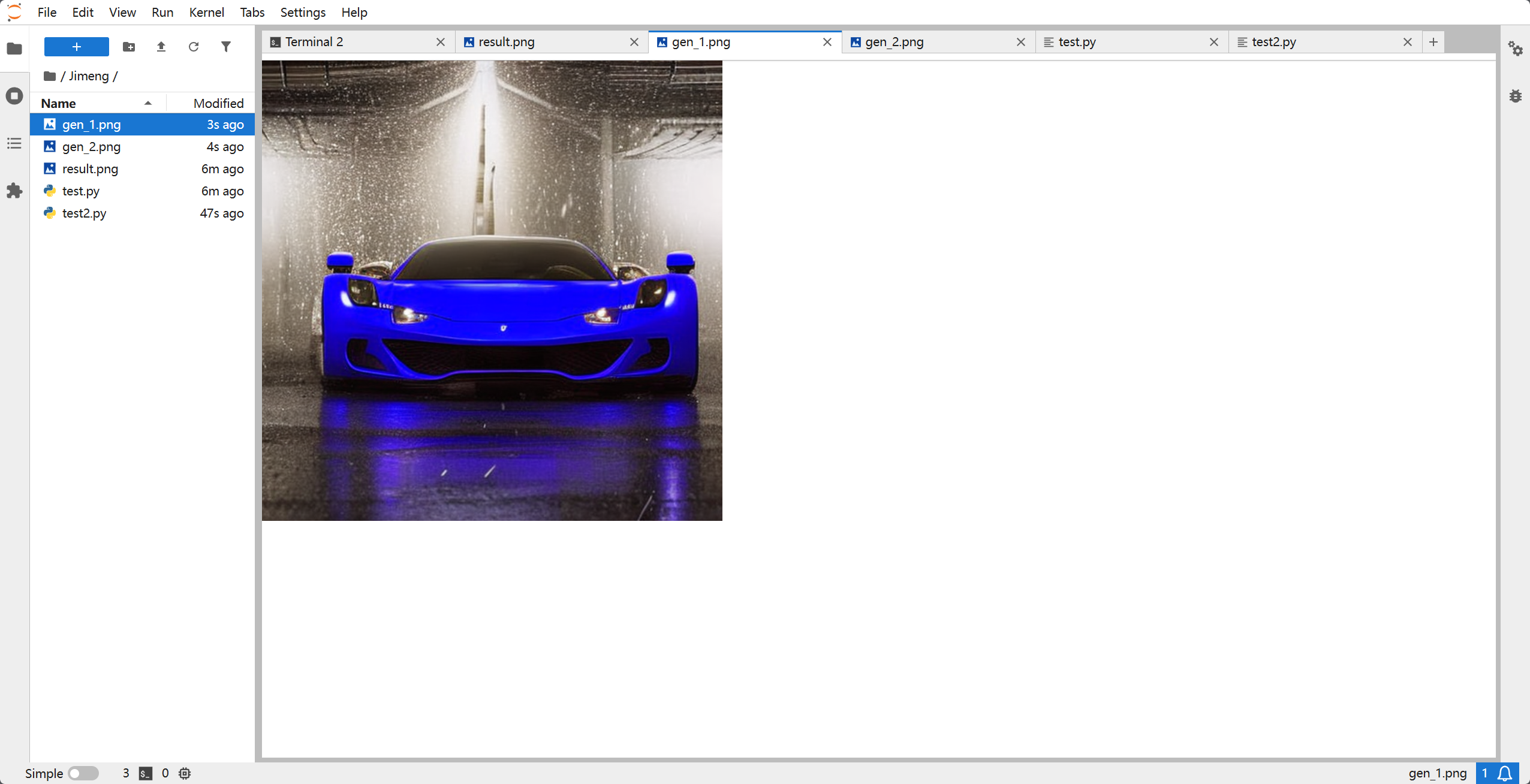
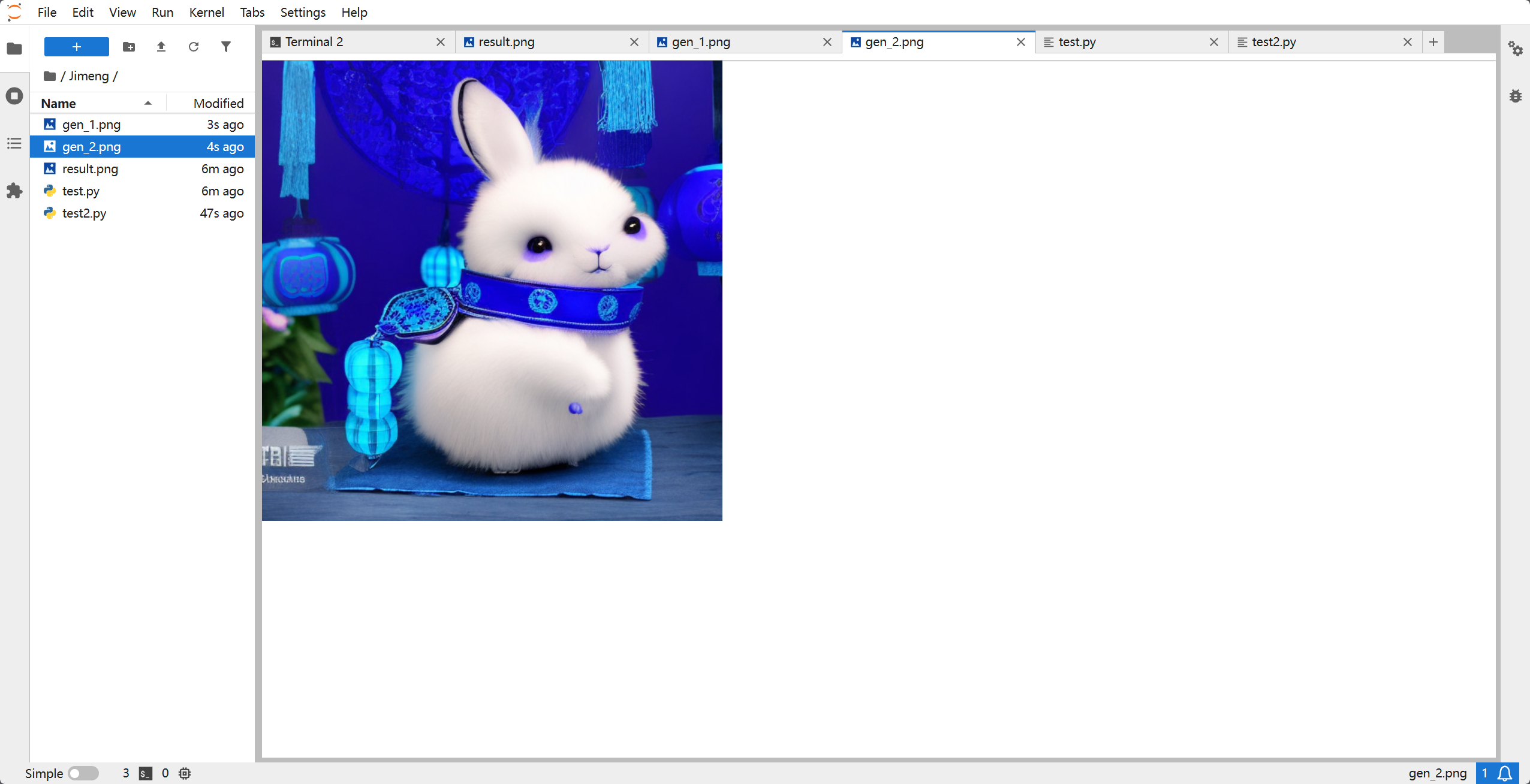
推荐测试词:
-
一只穿着汉服的可爱小熊猫,在竹林里喝茶,水墨画风格 -
赛博朋克风格的西安钟楼,霓虹灯光,雨夜,电影质感 -
唯美古风,一位仙女在月光下的荷塘起舞,高画质,精致五官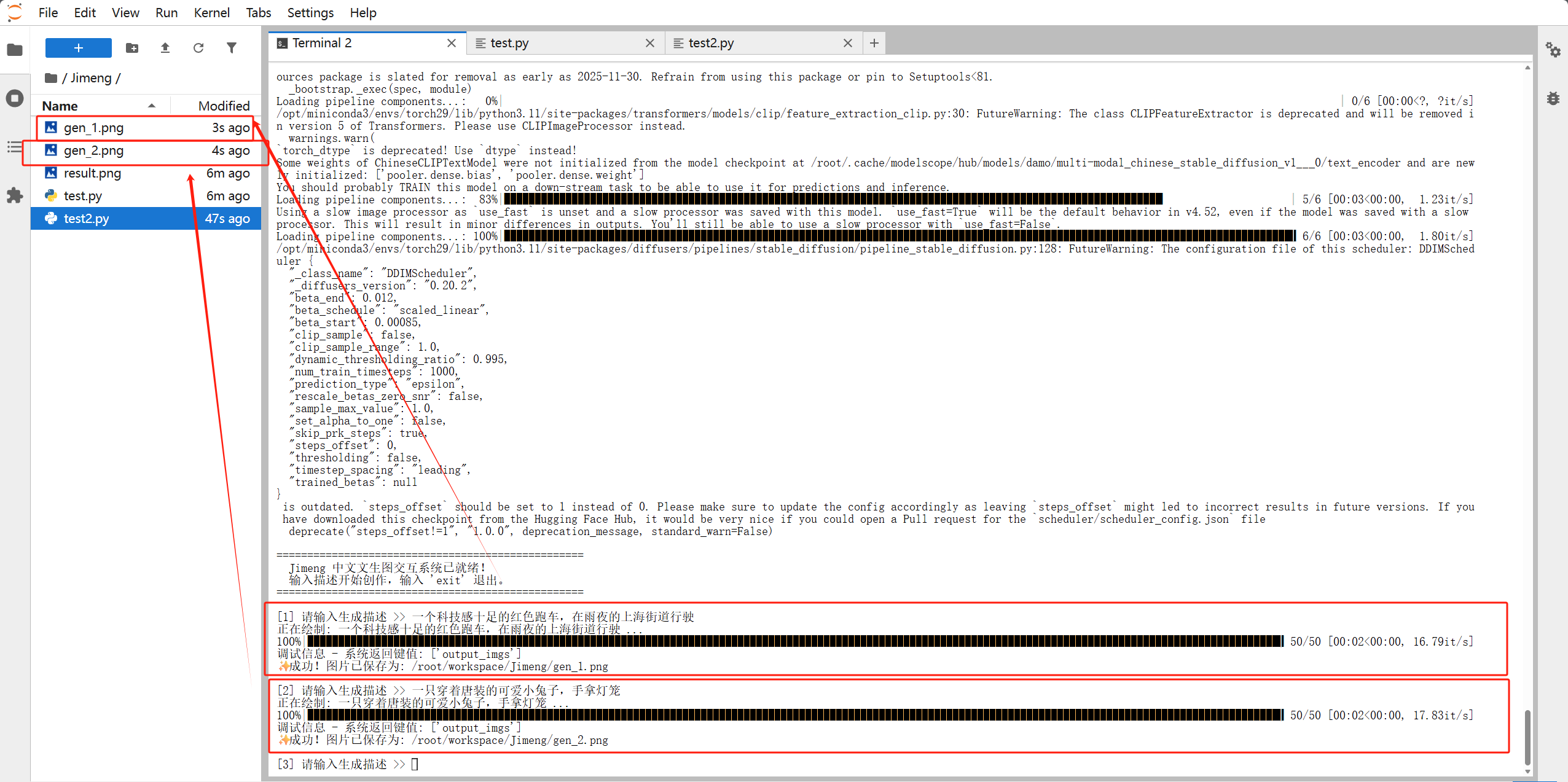
6. 避坑指南(FAQ)
-
报错:‘output_img’ 找不到
- 原因:由于版本差异,模型返回的可能是
image或images。 - 解决:本脚本中使用了
for key in [...]循环自动查找所有可能的键名。
- 原因:由于版本差异,模型返回的可能是
-
报错:The truth value of an array is ambiguous
- 原因:Python 尝试对 Numpy 数组直接进行真值判断。
- 解决:在脚本中使用
if raw_data is not None:替代if raw_data:。
-
显存不足 (OOM)
- 原因:GPU 显存被其他程序占用。
- 解决:执行
nvidia-smi检查进程,并确保没有同时运行多个大型推理任务。
7. 总结
通过本次部署,我们不仅成功运行了 Jimeng 模型,还通过 运行时补丁 的技术手段解决了跨版本库的兼容性难题。这种部署方式非常适合在算力平台上进行快速 Demo 展示或二次开发。
如果你需要将图片自动同步到阿里云,记得结合开头安装的 oss2 库,在保存文件后调用 bucket.put_object_from_file() 即可!
467b867ff6425f44962b.png)
深度實戰:在 GPU 環境下一鍵部署 Jimeng 中文文生圖互動系統
GPU 部署阿里 Jimeng 中文文生圖:ModelScope 載入 damo 模型,以 huggingface_hub 補丁解決 cached_download 相容問題,含單次測試與互動腳本及 OOM 等 FAQ。
來源:https://blog.csdn.net/2403_87969572/article/details/157399724
抓取時間(ISO本地):2026-05-18 05:17:37
這是一篇專門針對 Jimeng (積木/積夢) 中文文生圖模型的詳細部署教學部落格。包含了我們在實戰中遇到的所有“坑”及其解決方案,特別是針對庫版本衝突的硬核修復。
1. 什麼是 Jimeng?
Jimeng 是由阿里巴巴達摩院研發的、專門針對中文語境最佳化的文生圖模型。它將中文 BERT 與 Stable Diffusion 架構深度結合,無需繁瑣的英文翻譯,直接輸入中文(如“古風、水墨、賽博朋克”)即可生成極具東方審美的高質量影象。
2. 部署環境準備
在開始之前,請確保你的機器擁有 NVIDIA GPU(建議視訊記憶體 8GB 以上)並安裝了 Python 3.8+ 環境。
2.1 安裝核心依賴庫
除了基礎的 AI 框架,我們還需要安裝阿里雲的 oss2 庫(用於後續可能的圖片雲端儲存)以及處理庫版本衝突所需的補丁工具。
# 升級基礎 AI 庫
pip install -U modelscope transformers diffusers accelerate torch numpy pillow

# 安裝阿里雲 OSS 儲存庫
pip install oss2

# 安裝 omegaconf 用於處理特定的模型配置
pip install omegaconf
3. 核心技術痛點:處理版本衝突
注意! 這是部署 Jimeng 模型最關鍵的一步。由於模型釋出較早,它呼叫的 huggingface_hub 舊版函式 cached_download 在新版庫中已被刪除。如果不處理,程式會報錯 ImportError。
解決方案: 在指令碼的最開頭手動注入“執行時補丁”。
4. 編寫測試指令碼
我們將建立一個名為 test_jimeng.py 的指令碼。它不僅解決了相容性問題,還支援一次載入模型、多次互動生成,並具備極強的程式碼健壯性。
4.1 建立工作目錄
mkdir -p ~/workspace/Jimeng && cd ~/workspace/Jimeng
4.2 編寫 test_jimeng.py
請將以下程式碼完整複製到檔案中:
import huggingface_hub
try:
    from huggingface_hub import hf_hub_download
    huggingface_hub.cached_download = hf_hub_download
except ImportError:
    pass

import os
import torch
import numpy as np
from PIL import Image
from modelscope.pipelines import pipeline
from modelscope.utils.constant import Tasks

model_id = 'damo/multi-modal_chinese_stable_diffusion_v1.0'

try:
    print(f"正在啟動 Jimeng 引擎並載入權重...")
    # 強制在 GPU 執行
    pipe = pipeline(Tasks.text_to_image_synthesis, model=model_id, device='cuda')

    input_data = {'text': '一個穿著宇航服的大熊貓在月球上吃竹子,賽博朋克風格'}

    print("正在生成影象...")
    output = pipe(input_data)

    # --- 修復邏輯:安全提取並轉換圖片 ---
    raw_data = None
    if isinstance(output, dict):
        for key in ['output_img', 'output_imgs', 'image', 'images']:
            if key in output:
                raw_data = output[key]
                break
    else:
        raw_data = output

    # 處理列表情況
    if isinstance(raw_data, list):
        raw_data = raw_data[0]

    # 關鍵修復:使用 is not None 避免真值歧義錯誤
    if raw_data is not None:
        # 如果是 numpy 陣列,轉換為 PIL Image
        if isinstance(raw_data, np.ndarray):
            # 如果陣列值在 0-1 之間,縮放到 0-255
            if raw_data.max() <= 1.0:
                raw_data = (raw_data * 255).astype(np.uint8)
            final_image = Image.fromarray(raw_data)
        else:
            final_image = raw_data

        final_image.save("result.png")
        print(f"\n恭喜!生成成功。圖片已儲存至: {os.path.abspath('result.png')}")
    else:
        print("未能在輸出中找到影象資料。")
4.3 執行與測試
執行以下命令啟動系統:
python test_jimeng.py
5. 編寫互動式使用指令碼
import huggingface_hub
try:
    from huggingface_hub import hf_hub_download
    huggingface_hub.cached_download = hf_hub_download
except: pass

import os
import torch
import numpy as np
from PIL import Image
from modelscope.pipelines import pipeline
from modelscope.utils.constant import Tasks

print("正在初始化 Jimeng 互動引擎,請稍候...")
model_id = 'damo/multi-modal_chinese_stable_diffusion_v1.0'

# 顯式指定任務和裝置
pipe = pipeline(Tasks.text_to_image_synthesis, model=model_id, device='cuda')

print("\n" + "="*50)
print("  Jimeng 中文文生圖互動系統已就緒!")
print("  輸入描述開始創作,輸入 'exit' 退出。")
print("="*50)

count = 1
while True:
    prompt = input(f"\n[{count}] 請輸入生成描述 >> ").strip()

    if prompt.lower() in ['exit', 'quit', '退出']:
        break
    if not prompt: continue

    print(f"正在繪製: {prompt} ...")
    try:
        # 推理
        output = pipe({'text': prompt})

        # --- 健壯的圖片提取邏輯 ---
        image = None

        # 情況 A: 返回的是字典
        if isinstance(output, dict):
            print(f"除錯資訊 - 系統返回鍵值: {list(output.keys())}")
            # 嘗試所有可能的鍵
            for key in ['output_img', 'output_imgs', 'image', 'images']:
                if key in output:
                    image = output[key]
                    break
            # 如果字典裡只有一個值,嘗試直接取那個值
            if image is None and len(output) == 1:
                image = list(output.values())[0]

        # 情況 B: 直接返回了物件或列表
        else:
            image = output

        # 如果提取出來的是列表,取第一個
        if isinstance(image, list):
            image = image[0]

        # 轉換為 PIL 格式並儲存
        if image is not None:
            # 如果是 Numpy 陣列,轉為 Image 物件
            if isinstance(image, np.ndarray):
                if image.max() <= 1.0: image = (image * 255).astype(np.uint8)
                image = Image.fromarray(image)

            filename = f"gen_{count}.png"
            image.save(filename)
            print(f"✨  成功!圖片已儲存為: {os.path.abspath(filename)}")
            count += 1
        else:
            print("❌  錯誤:未能從模型輸出中提取到影象資料。")

    except Exception as e:
        print(f"💥  生成過程出錯: {e}")

print("系統已退出。")
推薦測試詞:
-
一隻穿著漢服的可愛小熊貓,在竹林裡喝茶,水墨畫風格 -
賽博朋克風格的西安鐘樓,霓虹燈光,雨夜,電影質感 -
唯美古風,一位仙女在月光下的荷塘起舞,高畫質,精緻五官
6. 避坑指南(FAQ)
-
報錯:‘output_img’ 找不到
- 原因:由於版本差異,模型返回的可能是
image或images。 - 解決:本指令碼中使用了
for key in [...]迴圈自動查詢所有可能的鍵名。
- 原因:由於版本差異,模型返回的可能是
-
報錯:The truth value of an array is ambiguous
- 原因:Python 嘗試對 Numpy 陣列直接進行真值判斷。
- 解決:在指令碼中使用
if raw_data is not None:替代if raw_data:。
-
視訊記憶體不足 (OOM)
- 原因:GPU 視訊記憶體被其他程式佔用。
- 解決:執行
nvidia-smi檢查程序,並確保沒有同時執行多個大型推理任務。
7. 總結
透過本次部署,我們不僅成功執行了 Jimeng 模型,還透過 執行時補丁 的技術手段解決了跨版本庫的相容性難題。這種部署方式非常適合在算力平臺上進行快速 Demo 展示或二次開發。
如果你需要將圖片自動同步到阿里雲,記得結合開頭安裝的 oss2 庫,在儲存檔案後呼叫 bucket.put_object_from_file() 即可!
467b867ff6425f44962b.png)
Hands-on: One-Click Jimeng Chinese Text-to-Image on GPU
Deploy Jimeng Chinese T2I on GPU via ModelScope, runtime Hub patch for cached_download, test and interactive scripts, plus OOM and output-key FAQs.
Captured at (local ISO): 2026-05-18 05:17:37
A deployment guide for Jimeng Chinese text-to-image, including real-world pitfalls—especially library version conflicts and runtime patches.
1. What Is Jimeng?
Jimeng (Alibaba DAMO) is a Chinese-optimized text-to-image model: Chinese BERT + Stable Diffusion. Type Chinese prompts directly (“古风、水墨、赛博朋克”) for Eastern-aesthetic images—no English prompt translation.
2. Environment
NVIDIA GPU (8 GB+ VRAM), Python 3.8+.
2.1 Dependencies
# 升级基础 AI 库
pip install -U modelscope transformers diffusers accelerate torch numpy pillow

# 安装阿里云 OSS 存储库
pip install oss2

# 安装 omegaconf 用于处理特定的模型配置
pip install omegaconf
3. Critical Fix: Version Conflicts
Jimeng calls legacy huggingface_hub.cached_download, removed in newer releases → ImportError without a patch.
Fix: inject a runtime shim at the top of your script.
4. Test Script
test_jimeng.py—patch, load once, robust image extraction.
4.1 Workspace
mkdir -p ~/workspace/Jimeng && cd ~/workspace/Jimeng
4.2 test_jimeng.py
import huggingface_hub
try:
    from huggingface_hub import hf_hub_download
    huggingface_hub.cached_download = hf_hub_download
except ImportError:
    pass

import os
import torch
import numpy as np
from PIL import Image
from modelscope.pipelines import pipeline
from modelscope.utils.constant import Tasks

model_id = 'damo/multi-modal_chinese_stable_diffusion_v1.0'

try:
    print(f"正在启动 Jimeng 引擎并加载权重...")
    # 强制在 GPU 运行
    pipe = pipeline(Tasks.text_to_image_synthesis, model=model_id, device='cuda')

    input_data = {'text': '一个穿着宇航服的大熊猫在月球上吃竹子,赛博朋克风格'}

    print("正在生成图像...")
    output = pipe(input_data)

    # --- 修复逻辑:安全提取并转换图片 ---
    raw_data = None
    if isinstance(output, dict):
        for key in ['output_img', 'output_imgs', 'image', 'images']:
            if key in output:
                raw_data = output[key]
                break
    else:
        raw_data = output

    # 处理列表情况
    if isinstance(raw_data, list):
        raw_data = raw_data[0]

    # 关键修复:使用 is not None 避免真值歧义错误
    if raw_data is not None:
        # 如果是 numpy 数组,转换为 PIL Image
        if isinstance(raw_data, np.ndarray):
            # 如果数组值在 0-1 之间,缩放到 0-255
            if raw_data.max() <= 1.0:
                raw_data = (raw_data * 255).astype(np.uint8)
            final_image = Image.fromarray(raw_data)
        else:
            final_image = raw_data

        final_image.save("result.png")
        print(f"\n恭喜!生成成功。图片已保存至: {os.path.abspath('result.png')}")
    else:
        print("未能在输出中找到图像数据。")
4.3 Run
python test_jimeng.py
5. Interactive Script
import huggingface_hub
try:
    from huggingface_hub import hf_hub_download
    huggingface_hub.cached_download = hf_hub_download
except: pass

import os
import torch
import numpy as np
from PIL import Image
from modelscope.pipelines import pipeline
from modelscope.utils.constant import Tasks

print("正在初始化 Jimeng 交互引擎,请稍候...")
model_id = 'damo/multi-modal_chinese_stable_diffusion_v1.0'

# 显式指定任务和设备
pipe = pipeline(Tasks.text_to_image_synthesis, model=model_id, device='cuda')

print("\n" + "="*50)
print("  Jimeng 中文文生图交互系统已就绪!")
print("  输入描述开始创作,输入 'exit' 退出。")
print("="*50)

count = 1
while True:
    prompt = input(f"\n[{count}] 请输入生成描述 >> ").strip()

    if prompt.lower() in ['exit', 'quit', '退出']:
        break
    if not prompt: continue

    print(f"正在绘制: {prompt} ...")
    try:
        # 推理
        output = pipe({'text': prompt})

        # --- 健壮的图片提取逻辑 ---
        image = None

        # 情况 A: 返回的是字典
        if isinstance(output, dict):
            print(f"调试信息 - 系统返回键值: {list(output.keys())}")
            # 尝试所有可能的键
            for key in ['output_img', 'output_imgs', 'image', 'images']:
                if key in output:
                    image = output[key]
                    break
            # 如果字典里只有一个值,尝试直接取那个值
            if image is None and len(output) == 1:
                image = list(output.values())[0]

        # 情况 B: 直接返回了对象或列表
        else:
            image = output

        # 如果提取出来的是列表,取第一个
        if isinstance(image, list):
            image = image[0]

        # 转换为 PIL 格式并保存
        if image is not None:
            # 如果是 Numpy 数组,转为 Image 对象
            if isinstance(image, np.ndarray):
                if image.max() <= 1.0: image = (image * 255).astype(np.uint8)
                image = Image.fromarray(image)

            filename = f"gen_{count}.png"
            image.save(filename)
            print(f"✨  成功!图片已保存为: {os.path.abspath(filename)}")
            count += 1
        else:
            print("❌  错误:未能从模型输出中提取到图像数据。")

    except Exception as e:
        print(f"💥  生成过程出错: {e}")

print("系统已退出。")
Sample prompts
一只穿着汉服的可爱小熊猫,在竹林里喝茶,水墨画风格赛博朋克风格的西安钟楼,霓虹灯光,雨夜,电影质感唯美古风,一位仙女在月光下的荷塘起舞,高画质,精致五官
6. FAQ
- Missing
output_img
Try keysimage/images—script loops all variants. - Truth value of an array is ambiguous
Useif raw_data is not None:notif raw_data:. - OOM
nvidia-smi; avoid multiple large jobs on one GPU.
7. Summary
Jimeng runs on GPU with a runtime cached_download patch for cross-version Hub compatibility—good for cloud demos and forks. For Aliyun upload, use oss2 and bucket.put_object_from_file() after save.