5分钟保姆级教程:部署 RexUniNLU 零样本通用语义理解引擎
5 分钟部署 RexUniNLU:用 ModelScope 加载 Siamese-UIE,仅需 Schema 标签即可零样本抽取意图与实体,含多场景示例与 FastAPI 封装及避坑说明。
1. 什么是 RexUniNLU / 零样本 NLU?
在传统的 NLP 任务中,如果你想识别“订票”意图和“目的地”槽位,你需要标注成千上万条数据并训练模型。
RexUniNLU(基于 Siamese-UIE 架构) 改变了游戏规则:无需任何标注数据。你只需要给模型一个 Schema(标签定义),它就能通过语义匹配直接识别出意图和实体。
2. 环境准备
推荐使用 Python 虚拟环境(如 Conda)以避免依赖冲突。
- 操作系统: Windows, Linux 或 macOS
- Python 版本: 3.8 - 3.11
- 核心库: ModelScope(魔搭社区,国内环境极速下载)
执行以下命令安装依赖:
# 切换到你的 Python 环境
pip install modelscope -i https://pypi.tuna.tsinghua.edu.cn/simple
pip install torch torchvision torchaudio  # 确保已安装 PyTorch
3. 核心部署代码
新建一个文件 rex_nlu_test.py。我们直接使用经过验证的官方旗舰模型 damo/nlp_structbert_siamese-uie_chinese-base,它是 RexUniNLU 效果最稳的底层实现。
from modelscope.pipelines import pipeline
from modelscope.utils.constant import Tasks

# 1. 初始化模型(只需一次)
print("正在加载 RexUniNLU 核心引擎...")
model_id = 'damo/nlp_structbert_siamese-uie_chinese-base'
p = pipeline(Tasks.siamese_uie, model=model_id)

def quick_test(title, text, labels):
    """
    封装测试函数
    title: 场景名称
    text: 待分析文本
    labels: 你定义的标签(意图或槽位)
    """
    # 构造标准 Schema 格式
    schema = {label: None for label in labels}

    # 执行推理
    result = p(text, schema=schema)

    print(f"\n场景:【{title}】")
    print(f"输入文本:\"{text}\"")
    print(f"定义标签:{labels}")
    print("识别结果:")

    found = False
    if result and 'output' in result:
        for item_list in result['output']:
            for item in item_list:
                # 打印出:[标签] -> 提取到的内容
                print(f"  ✅  [{item['type']}] -> {item['span']}")
                found = True

    if not found:
        print("  ❌  未匹配到任何信息 (请尝试调整标签名称)")
    print("-" * 50)

# ---------------------------------------------------------
# 2. 多场景零样本测试
# ---------------------------------------------------------

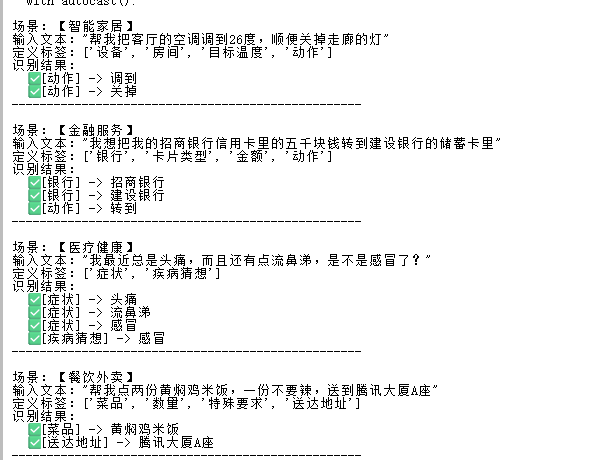
# 例子 1:智能家居(指令控制)
quick_test(
    "智能家居",
    "帮我把客厅的空调调到26度,顺便关掉走廊的灯",
    ["设备", "房间", "目标温度", "动作"]
)

# 例子 2:金融理财(复杂实体)
quick_test(
    "金融服务",
    "我想把我的招商银行信用卡里的五千块钱转到建设银行的储蓄卡里",
    ["银行", "卡片类型", "金额", "动作"]
)

# 例子 3:医疗健康(症状咨询)
quick_test(
    "医疗健康",
    "我最近总是头痛,而且还有点流鼻涕,是不是感冒了?",
    ["症状", "疾病猜想"]
)

# 例子 4:餐饮外卖(订单抽取)
quick_test(
    "餐饮外卖",
    "帮我点两份黄焖鸡米饭,一份不要辣,送到腾讯大厦A座",
    ["菜品", "数量", "特殊要求", "送达地址"]
)
4. 进阶:部署为 API 服务
如果你需要将此功能供其他程序(如前端、APP)调用,可以使用 FastAPI 快速封装。
安装服务框架:
pip install fastapi uvicorn
创建 server.py:
from fastapi import FastAPI, Body
from modelscope.pipelines import pipeline

app = FastAPI()
# 启动加载模型
p = pipeline('siamese-uie', model='damo/nlp_structbert_siamese-uie_chinese-base')

@app.post("/nlu")
async def nlu_api(data: dict = Body(...)):
    text = data.get("text", "")
    labels = data.get("labels", [])
    # 构造 Schema
    schema = {label: None for label in labels}
    res = p(text, schema=schema)
    return {"status": "success", "data": res.get('output', [])}

if __name__ == "__main__":
    import uvicorn
    uvicorn.run(app, host="0.0.0.0", port=8000)
运行后,通过 http://localhost:8000/nlu 即可进行 POST 访问。
5. 避坑指南与技巧(README)
- 标签起名有讲究:
- 模型是通过语义理解的。识别“北京”,标签起名为
城市或地点效果很好;起名为X1则完全无效。 - 意图识别建议带上动词,如
查询天气优于天气。
- 模型是通过语义理解的。识别“北京”,标签起名为
- 网络问题:
- 在境内服务器部署时,
ModelScope优于HuggingFace,因为它走的是阿里云内网 CDN,下载模型不会报错或超时。
- 在境内服务器部署时,
- 性能优化:
- 如果有 GPU,模型会自动加载到 CUDA 上。如果只有 CPU,推理单条话术约需 100-200ms,适合低并发场景。
- Schema 报错:
- 请务必使用
{"标签": None}的字典格式,不要直接传列表给模型。
- 请务必使用
6. 总结
通过这套方案,你无需一行标注数据,就能在 5 分钟内搭建起一套支持无限场景的自然语言理解系统。无论是做聊天机器人、自动化工单还是智能家居控制,RexUniNLU 都是目前性价比最高的选择。
发布于:2026年1月 | 技术栈:Python, ModelScope, StructBERT
5分鐘保姆級教程:部署 RexUniNLU 零樣本通用語義理解引擎
5 分鐘部署 RexUniNLU:用 ModelScope 載入 Siamese-UIE,僅需 Schema 標籤即可零樣本抽取意圖與實體,含多場景範例與 FastAPI 封裝及避坑說明。
來源:https://blog.csdn.net/2403_87969572/article/details/157372458
抓取時間(ISO本地):2026-05-18 05:17:33
文章目錄
1. 什麼是 RexUniNLU / 零樣本 NLU?
在傳統的 NLP 任務中,如果你想識別“訂票”意圖和“目的地”槽位,你需要標註成千上萬條資料並訓練模型。
RexUniNLU(基於 Siamese-UIE 架構) 改變了遊戲規則:無需任何標註資料。你只需要給模型一個 Schema(標籤定義),它就能透過語義匹配直接識別出意圖和實體。
2. 環境準備
推薦使用 Python 虛擬環境(如 Conda)以避免依賴衝突。
- 作業系統: Windows, Linux 或 macOS
- Python 版本: 3.8 - 3.11
- 核心庫: ModelScope(魔搭社群,國內環境極速下載)
執行以下命令安裝依賴:
# 切換到你的 Python 環境
pip install modelscope -i https://pypi.tuna.tsinghua.edu.cn/simple
pip install torch torchvision torchaudio  # 確保已安裝 PyTorch
3. 核心部署程式碼
新建一個檔案 rex_nlu_test.py。我們直接使用經過驗證的官方旗艦模型 damo/nlp_structbert_siamese-uie_chinese-base,它是 RexUniNLU 效果最穩的底層實現。
from modelscope.pipelines import pipeline
from modelscope.utils.constant import Tasks

# 1. 初始化模型(只需一次)
print("正在載入 RexUniNLU 核心引擎...")
model_id = 'damo/nlp_structbert_siamese-uie_chinese-base'
p = pipeline(Tasks.siamese_uie, model=model_id)

def quick_test(title, text, labels):
    """
    封裝測試函式
    title: 場景名稱
    text: 待分析文字
    labels: 你定義的標籤(意圖或槽位)
    """
    # 構造標準 Schema 格式
    schema = {label: None for label in labels}

    # 執行推理
    result = p(text, schema=schema)

    print(f"\n場景:【{title}】")
    print(f"輸入文字:\"{text}\"")
    print(f"定義標籤:{labels}")
    print("識別結果:")

    found = False
    if result and 'output' in result:
        for item_list in result['output']:
            for item in item_list:
                # 列印出:[標籤] -> 提取到的內容
                print(f"  ✅  [{item['type']}] -> {item['span']}")
                found = True

    if not found:
        print("  ❌  未匹配到任何資訊 (請嘗試調整標籤名稱)")
    print("-" * 50)

# ---------------------------------------------------------
# 2. 多場景零樣本測試
# ---------------------------------------------------------

# 例子 1:智慧家居(指令控制)
quick_test(
    "智慧家居",
    "幫我把客廳的空調調到26度,順便關掉走廊的燈",
    ["裝置", "房間", "目標溫度", "動作"]
)

# 例子 2:金融理財(複雜實體)
quick_test(
    "金融服務",
    "我想把我的招商銀行信用卡里的五千塊錢轉到建設銀行的儲蓄卡里",
    ["銀行", "卡片型別", "金額", "動作"]
)

# 例子 3:醫療健康(症狀諮詢)
quick_test(
    "醫療健康",
    "我最近總是頭痛,而且還有點流鼻涕,是不是感冒了?",
    ["症狀", "疾病猜想"]
)

# 例子 4:餐飲外賣(訂單抽取)
quick_test(
    "餐飲外賣",
    "幫我點兩份黃燜雞米飯,一份不要辣,送到騰訊大廈A座",
    ["菜品", "數量", "特殊要求", "送達地址"]
)
4. 進階:部署為 API 服務
如果你需要將此功能供其他程式(如前端、APP)呼叫,可以使用 FastAPI 快速封裝。
安裝服務框架:
pip install fastapi uvicorn
建立 server.py:
from fastapi import FastAPI, Body
from modelscope.pipelines import pipeline

app = FastAPI()
# 啟動載入模型
p = pipeline('siamese-uie', model='damo/nlp_structbert_siamese-uie_chinese-base')

@app.post("/nlu")
async def nlu_api(data: dict = Body(...)):
    text = data.get("text", "")
    labels = data.get("labels", [])
    # 構造 Schema
    schema = {label: None for label in labels}
    res = p(text, schema=schema)
    return {"status": "success", "data": res.get('output', [])}

if __name__ == "__main__":
    import uvicorn
    uvicorn.run(app, host="0.0.0.0", port=8000)
執行後,透過 http://localhost:8000/nlu 即可進行 POST 訪問。
5. 避坑指南與技巧(README)
- 標籤起名有講究:
- 模型是透過語義理解的。識別“北京”,標籤起名為
城市或地點效果很好;起名為X1則完全無效。 - 意圖識別建議帶上動詞,如
查詢天氣優於天氣。
- 模型是透過語義理解的。識別“北京”,標籤起名為
- 網路問題:
- 在境內伺服器部署時,
ModelScope優於HuggingFace,因為它走的是阿里雲內網 CDN,下載模型不會報錯或超時。
- 在境內伺服器部署時,
- 效能最佳化:
- 如果有 GPU,模型會自動載入到 CUDA 上。如果只有 CPU,推理單條話術約需 100-200ms,適合低併發場景。
- Schema 報錯:
- 請務必使用
{"標籤": None}的字典格式,不要直接傳列表給模型。
- 請務必使用
6. 總結
透過這套方案,你無需一行標註資料,就能在 5 分鐘內搭建起一套支援無限場景的自然語言理解系統。無論是做聊天機器人、自動化工單還是智慧家居控制,RexUniNLU 都是目前價效比最高的選擇。
釋出於:2026年1月 | 技術棧:Python, ModelScope, StructBERT
5-Minute Guide: Deploy RexUniNLU Zero-Shot Semantic Understanding
Deploy RexUniNLU in minutes via ModelScope Siamese-UIE—schema-only zero-shot intent/entity extraction, multi-scenario demos, FastAPI wrapper, and practical tips.
Captured at (local ISO): 2026-05-18 05:17:33
1. What Is RexUniNLU / Zero-Shot NLU?
Classic NLP needs thousands of labeled examples to learn intents and slots.
RexUniNLU (Siamese-UIE) needs no labeled data: define a Schema (label names) and the model matches semantics to extract intents and entities.
2. Environment Setup
Use a virtual env (e.g. Conda) to avoid conflicts.
- OS: Windows, Linux, or macOS
- Python: 3.8–3.11
- Core: ModelScope (fast downloads in China)
# 切换到你的 Python 环境
pip install modelscope -i https://pypi.tuna.tsinghua.edu.cn/simple
pip install torch torchvision torchaudio  # 确保已安装 PyTorch
3. Core Deployment Code
Create rex_nlu_test.py using the flagship checkpoint damo/nlp_structbert_siamese-uie_chinese-base.
from modelscope.pipelines import pipeline
from modelscope.utils.constant import Tasks

# 1. 初始化模型(只需一次)
print("正在加载 RexUniNLU 核心引擎...")
model_id = 'damo/nlp_structbert_siamese-uie_chinese-base'
p = pipeline(Tasks.siamese_uie, model=model_id)

def quick_test(title, text, labels):
    """
    封装测试函数
    title: 场景名称
    text: 待分析文本
    labels: 你定义的标签(意图或槽位)
    """
    # 构造标准 Schema 格式
    schema = {label: None for label in labels}

    # 执行推理
    result = p(text, schema=schema)

    print(f"\n场景:【{title}】")
    print(f"输入文本:\"{text}\"")
    print(f"定义标签:{labels}")
    print("识别结果:")

    found = False
    if result and 'output' in result:
        for item_list in result['output']:
            for item in item_list:
                # 打印出:[标签] -> 提取到的内容
                print(f"  ✅  [{item['type']}] -> {item['span']}")
                found = True

    if not found:
        print("  ❌  未匹配到任何信息 (请尝试调整标签名称)")
    print("-" * 50)

# ---------------------------------------------------------
# 2. 多场景零样本测试
# ---------------------------------------------------------

# 例子 1:智能家居(指令控制)
quick_test(
    "智能家居",
    "帮我把客厅的空调调到26度,顺便关掉走廊的灯",
    ["设备", "房间", "目标温度", "动作"]
)

# 例子 2:金融理财(复杂实体)
quick_test(
    "金融服务",
    "我想把我的招商银行信用卡里的五千块钱转到建设银行的储蓄卡里",
    ["银行", "卡片类型", "金额", "动作"]
)

# 例子 3:医疗健康(症状咨询)
quick_test(
    "医疗健康",
    "我最近总是头痛,而且还有点流鼻涕,是不是感冒了?",
    ["症状", "疾病猜想"]
)

# 例子 4:餐饮外卖(订单抽取)
quick_test(
    "餐饮外卖",
    "帮我点两份黄焖鸡米饭,一份不要辣,送到腾讯大厦A座",
    ["菜品", "数量", "特殊要求", "送达地址"]
)
4. Advanced: API Service
Wrap with FastAPI for apps/frontends.
pip install fastapi uvicorn
server.py:
from fastapi import FastAPI, Body
from modelscope.pipelines import pipeline

app = FastAPI()
# 启动加载模型
p = pipeline('siamese-uie', model='damo/nlp_structbert_siamese-uie_chinese-base')

@app.post("/nlu")
async def nlu_api(data: dict = Body(...)):
    text = data.get("text", "")
    labels = data.get("labels", [])
    # 构造 Schema
    schema = {label: None for label in labels}
    res = p(text, schema=schema)
    return {"status": "success", "data": res.get('output', [])}

if __name__ == "__main__":
    import uvicorn
    uvicorn.run(app, host="0.0.0.0", port=8000)
POST to http://localhost:8000/nlu.
5. Tips & Pitfalls
- Label naming matters: semantic names like
城市/地点work;X1does not. Prefer verb phrases for intents (查询天气>天气). - Network: In China, ModelScope beats Hugging Face (Aliyun CDN).
- Performance: GPU auto-used; CPU ~100–200 ms/utterance for low QPS.
- Schema format: use
{"label": None}dict, not a bare list.
6. Summary
No annotation—build multi-scenario NLU in minutes for bots, tickets, or smart home. RexUniNLU is a high-value zero-shot option.
Published: Jan 2026 | Stack: Python, ModelScope, StructBERT