Python:ImportError:DLL loadfailed while importing onnxruntime_pybind11_state: 动态链接库(DLL)初始化例程失败 报错解决
人脸识别项目中onnxruntime DLL加载失败的多种解决方案:降级GPU版1.14.1、重装、清理GPU/CPU冲突、安装VC++ 2019运行库,以及Anaconda新建Python 3.9环境。
目录标题
项目场景:
在进行一个文件夹内人脸识别与对比聚类的功能时候,遇到这个错误,查询得知通常是由于 onnxruntime 库安装不正确或与你的系统环境不兼容导致的。具体可能对应到python与onnxruntime 的版本对应问题,但是目前也没有查询到完整的对应版本,整理了网上的资料,只能逐个试试以下方法来解决了
解决方案:
1、降级onnxruntime 为1.14.1 版本
执行以下代码:
pip uninstall onnxruntime
pip install onnxruntime-gpu==1.14.1
我最后是通过这个方法解决的报错,这边附上我的相关库的版本
| 库名称 | 版本号 |
|---|---|
| onnxruntime-gpu | 1.14.1 |
| onnx | 1.12.0 |
| numpy | 1.26.4 |
| torch | 2.5.1+cu121 |
| tensorflow | 2.10.0 |
| opencv-python | 4.11.0.86 |
| pillow | 10.2.0 |
2、卸载重新安装 onnxruntime
执行以下代码:
pip uninstall onnxruntime
pip install onnxruntime
3、检查是否存在GPU与CPU的版本冲突
卸载 GPU 和 CPU 版本避免冲突
pip uninstall onnxruntime -y
pip uninstall onnxruntime-gpu -y
清理 pip 缓存
pip cache purge
然后根据需要只装一个版本:
如果你要使用 GPU(CUDA 支持)
pip install onnxruntime-gpu==1.16.0
或者如果你只用 CPU
pip install onnxruntime==1.21.1
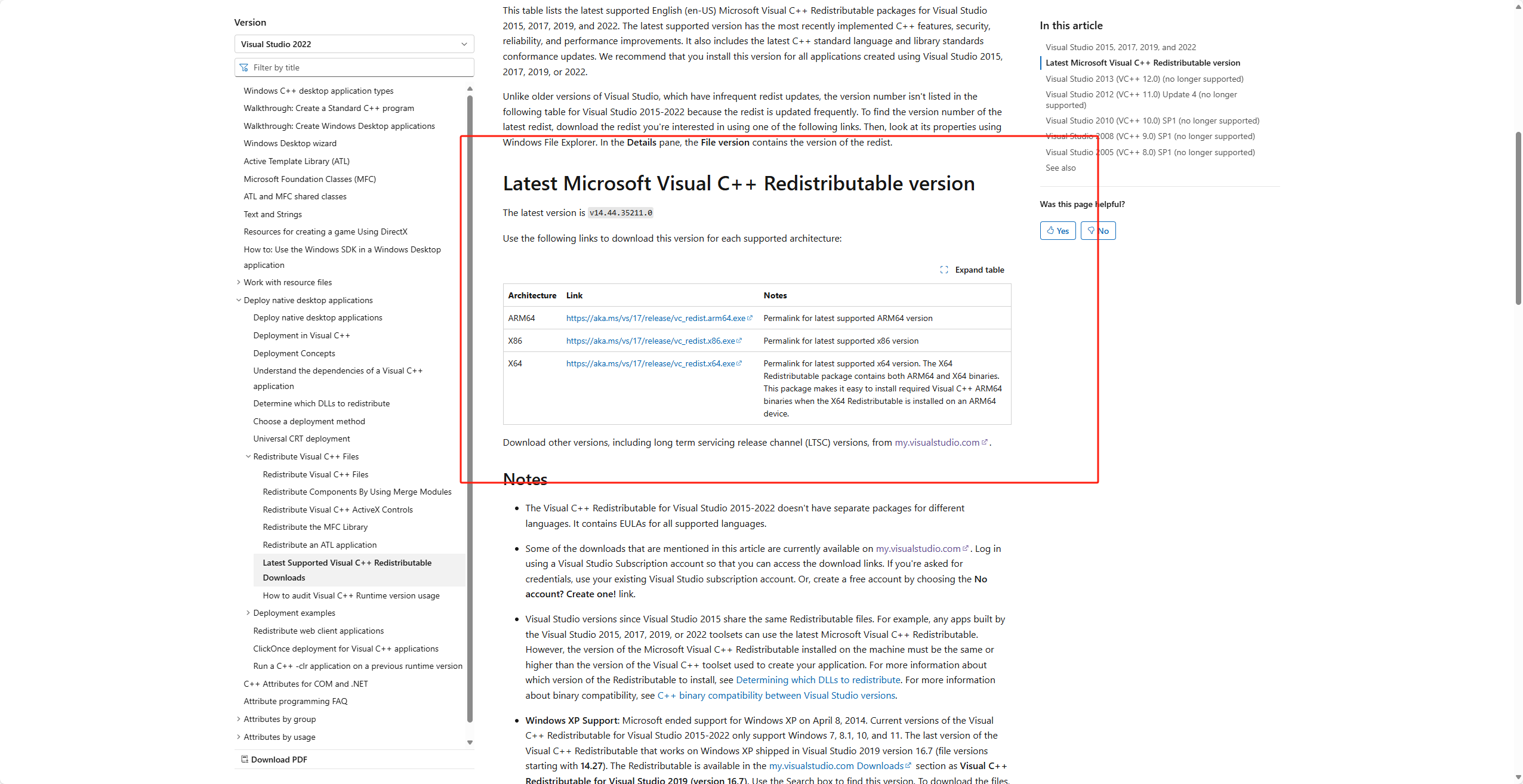
4、安装 Visual C++ 2019 可再发行组件包
可能是由DLL 初始化失败可能与系统运行时库缺失有关,尝试安装 Microsoft Visual C++ 2019 Redistributable:
从微软官网下载并安装以下链接:Visual C++ 2019
5、创建干净的新环境 并考虑python版本
怀疑onnxruntime库的报错问题与python环境版本相关,通过 Anaconda 的虚拟环境机制解决问题。原作者这里尝试使用python3.9.19版本
1、安装 Anaconda(如未安装):
从 Anaconda 官网 下载并安装适合操作系统的版本。Anaconda 官网
2、创建独立环境:
打开 Anaconda Prompt 或终端,执行以下命令创建指定 Python 版本的环境
conda create -n onnxruntime python=3.9.19
3、激活环境:
conda activate onnxruntime
4、安装 CPU 版 ONNX Runtime:
pip install onnxruntime
该方法来自博主[Au237]的文章,这边附上原文链接:
————————————————
版权声明:本文为CSDN博主「Au237」的原创文章,遵循CC 4.0 BY-SA版权协议,转载请附上原文出处链接及本声明。
原文链接:ImportError: DLL load failed while importing onnxruntime_pybind11_state: 动态链 接库(DLL)初始化例程失败。问题解决办法
Python:ImportError:DLL loadfailed while importing onnxruntime_pybind11_state: 動態鏈接庫(DLL)初始化例程失敗 報錯解決
人臉識別專案中onnxruntime DLL載入失敗的多種解決方案:降級GPU版1.14.1、重裝、清理GPU/CPU衝突、安裝VC++ 2019執行庫,以及Anaconda新建Python 3.9環境。
來源:https://blog.csdn.net/2403_87969572/article/details/152164345
抓取時間(ISO本地):2026-05-18 05:17:04
目錄標題
項目場景:
在進行一個文件夾內人臉識別與對比聚類的功能時候,遇到這個錯誤,查詢得知通常是由於 onnxruntime 庫安裝不正確或與你的系統環境不兼容導致的。具體可能對應到python與onnxruntime 的版本對應問題,但是目前也沒有查詢到完整的對應版本,整理了網上的資料,只能逐個試試以下方法來解決了
解決方案:
1、降級onnxruntime 為1.14.1 版本
執行以下代碼:
pip uninstall onnxruntime
pip install onnxruntime-gpu==1.14.1
我最後是通過這個方法解決的報錯,這邊附上我的相關庫的版本
| 庫名稱 | 版本號 |
|---|---|
| onnxruntime-gpu | 1.14.1 |
| onnx | 1.12.0 |
| numpy | 1.26.4 |
| torch | 2.5.1+cu121 |
| tensorflow | 2.10.0 |
| opencv-python | 4.11.0.86 |
| pillow | 10.2.0 |
2、卸載重新安裝 onnxruntime
執行以下代碼:
pip uninstall onnxruntime
pip install onnxruntime
3、檢查是否存在GPU與CPU的版本衝突
卸載 GPU 和 CPU 版本避免衝突
pip uninstall onnxruntime -y
pip uninstall onnxruntime-gpu -y
清理 pip 緩存
pip cache purge
然後根據需要只裝一個版本:
如果你要使用 GPU(CUDA 支持)
pip install onnxruntime-gpu==1.16.0
或者如果你只用 CPU
pip install onnxruntime==1.21.1
4、安裝 Visual C++ 2019 可再發行組件包
可能是由DLL 初始化失敗可能與系統運行時庫缺失有關,嘗試安裝 Microsoft Visual C++ 2019 Redistributable:
從微軟官網下載並安裝以下鏈接:Visual C++ 2019
5、創建乾淨的新環境 並考慮python版本
懷疑onnxruntime庫的報錯問題與python環境版本相關,通過 Anaconda 的虛擬環境機制解決問題。原作者這裡嘗試使用python3.9.19版本
1、安裝 Anaconda(如未安裝):
從 Anaconda 官網 下載並安裝適合操作系統的版本。Anaconda 官網
2、創建獨立環境:
打開 Anaconda Prompt 或終端,執行以下命令創建指定 Python 版本的環境
conda create -n onnxruntime python=3.9.19
3、激活環境:
conda activate onnxruntime
4、安裝 CPU 版 ONNX Runtime:
pip install onnxruntime
該方法來自博主[Au237]的文章,這邊附上原文鏈接:
————————————————
版權聲明:本文為CSDN博主「Au237」的原創文章,遵循CC 4.0 BY-SA版權協議,轉載請附上原文出處鏈接及本聲明。
原文鏈接:ImportError: DLL load failed while importing onnxruntime_pybind11_state: 動態鏈 接庫(DLL)初始化例程失敗。問題解決辦法
Python: ImportError: DLL load failed while importing onnxruntime_pybind11_state — DLL initialization routine failed (fix)
Fix onnxruntime DLL load failures: downgrade to GPU 1.14.1, reinstall, resolve GPU/CPU conflicts, install VC++ 2019, or use a clean Python 3.9 conda env.
Captured at (local ISO): 2026-05-18 05:17:04
Scenario
While building face recognition, comparison, and clustering in a folder, I hit this error. It usually means onnxruntime is installed incorrectly or is incompatible with your system—often a Python / onnxruntime version mismatch. There is no complete official compatibility matrix online, so I collected fixes from the community and tried them one by one.
Solutions
1. Downgrade onnxruntime to 1.14.1
Run:
pip uninstall onnxruntime
pip install onnxruntime-gpu==1.14.1
This is what finally fixed it for me. Versions I used:
| Package | Version |
|---|---|
| onnxruntime-gpu | 1.14.1 |
| onnx | 1.12.0 |
| numpy | 1.26.4 |
| torch | 2.5.1+cu121 |
| tensorflow | 2.10.0 |
| opencv-python | 4.11.0.86 |
| pillow | 10.2.0 |
2. Uninstall and reinstall onnxruntime
Run:
pip uninstall onnxruntime
pip install onnxruntime
3. Check for GPU vs CPU version conflicts
Remove both GPU and CPU builds to avoid conflicts:
pip uninstall onnxruntime -y
pip uninstall onnxruntime-gpu -y
Clear pip cache:
pip cache purge
Then install only what you need.
For GPU (CUDA):
pip install onnxruntime-gpu==1.16.0
Or CPU only:
pip install onnxruntime==1.21.1
4. Install Visual C++ 2019 Redistributable
DLL init failures can mean missing runtime libraries. Install Microsoft Visual C++ 2019 Redistributable from: Visual C++ 2019
5. Create a clean environment and consider Python version
The issue may depend on Python version. The original author used Anaconda with Python 3.9.19.
- Install Anaconda if needed: Anaconda
- Create an environment:
conda create -n onnxruntime python=3.9.19
- Activate:
conda activate onnxruntime
- Install CPU ONNX Runtime:
pip install onnxruntime
Method from blogger [Au237]; original post:
————————————————
Copyright: CSDN blogger 「Au237」, CC 4.0 BY-SA. Please link to the source when reposting.
Original: ImportError: DLL load failed while importing onnxruntime_pybind11_state — fix